
Get more than you expect from a backup program
|
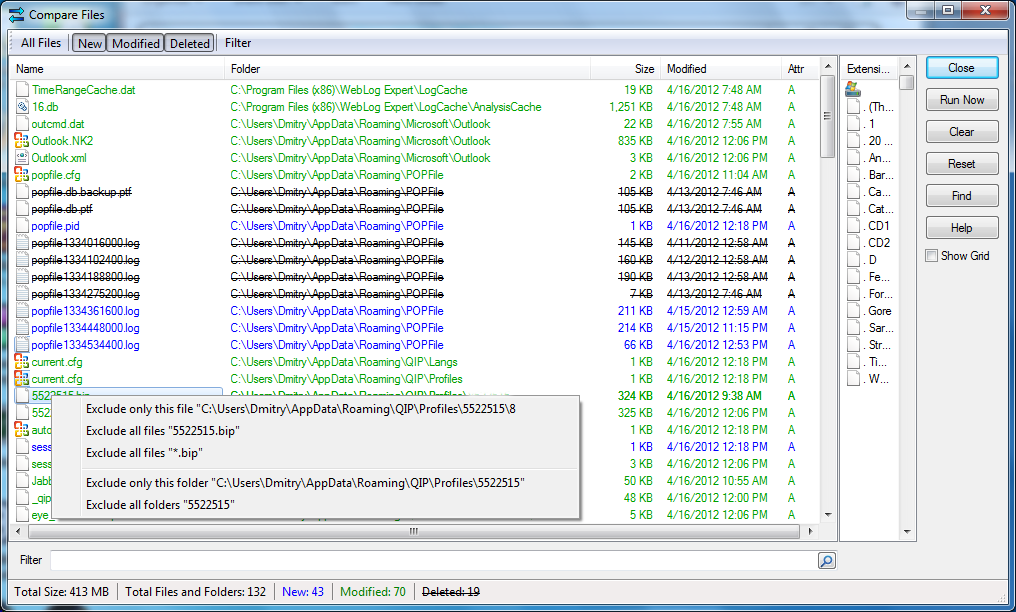
The Compare Files dialog box displays the list of files. New files appear in blue, modified files are in green, deleted files are marked with a strike-out and conflict files are in red.
Item
|
Description
|
All Files
|
Press this button to show all files.
|
New
|
Press this button to show files that were created since the last synchronization.
|
Modified
|
Press this button to show modified files.
|
Deleted
|
Press this button to show deleted files.
|
Conflicts
|
Press this button to show file conflicts.
|
Filter
|
Switches on/off filtering by file extension.
|
Files List
|
Shows the files and folders list.
|
Close
|
Closes the dialog.
|
Run Now
|
Closes the dialog and run the current profile.
|
Clear
|
Packet Synchronization:
Clears remote files list. All local files are treated as new and will be included in the package.
Synchronize source and destination:
Clears a list of synchronized files. All files which are exist on one side only will be treated as new.
|
Reset
|
Resets remote files list to the local ones. All remote files will be treated as up to date.
|
Find
|
Opens Find Text dialog to look for a file name in the list.
|
Show Grid
|
Overlays a grid on the list.
|
Open local menu under any item in the list if you want to exclude it or it's folder from processing.
|
|
SmartSync Pro Help Contents
| |


 Sign me up

