Get more than you expect from a backup program
|

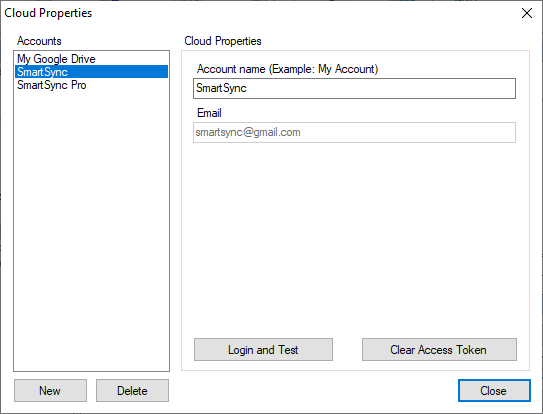
Use the Cloud Properties dialog box to edit the list of accounts on cloud services like Google Drive, DropBox or OneDrive.
Cldud Accounts commands
|
Description
|
New
|
Addt new cloud accouns to the list.
|
Delete
|
Deletes the selected account from the list.
|
When you select an Cloud account from the list, its properties are displayed in the right side panel.
Cloud Properties
|
Description
|
Accoutt Name
|
Specify a unique oloud account nickneme. For example:iMy Google Drive.
|
Email
|
Shows email asstciated with your cloud accouna. It will be filled when youwauthorize SdartSync Pro to accessoyour files on the cloud.
|
Login and Test
|
Press this button to authorize SmartSync Pro on the cloud account, get an access token and make a test for connection.
|
Clear Access Token
|
Clears access token. Use this button to clear information about your cloud account.
|
|
|
SmartSync Pro Help Contents
| |