
Get more than you expect from a backup program
Microsoft Azure Properties
|
Top
|
|
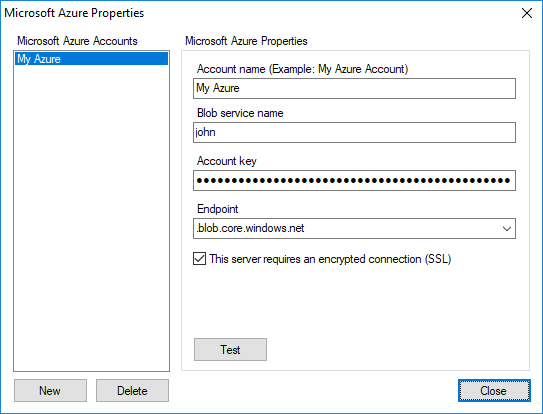
Use the Microsoft Azure Properties dialog box to edit the list of Microsoft Azure accounts.
Microsoft Azure Accounts commands
|
Description
|
New
|
Adds new Microsoft Azure account to the list.
|
Delete
|
Deletes the selected account from the list.
|
When you select an Microsoft Azure account from the list, its properties are displayed in the right side panel.
Microsoft Azure properties
|
Description
|
Account Name
|
Specify a unique Microsoft Azure account nickname. For example: My Azure.
|
Blob service name
|
Specify blob service name.
|
Account key
|
When you create a storage account, Azure generates two 512-bit storage access keys, which are used for authentication when the storage account is accessed. In the Azure portal, navigate to your storage account, click All settings and then click Access keys to view, copy, and regenerate your account access keys.
|
Endpoint
|
Specifies the blob service Uniform Resource Locator (URL) to use. Default value .blob.core.windows.net
|
This server requires an encrypted connection (SSL)
|
Check this box if you want to use Secure Socket Layer (SSL) for connection. This also known as HTTPS.
|
Test
|
Press this button to make a test connection using specified parameters.
|
|
|
SmartSync Pro Help Contents
| |


 Sign me up

