Get more than you expect from a backup program


| Newsletters |
 Sign me up
|


|
Profile Properties | Notifications |
Top Previous Next |
|
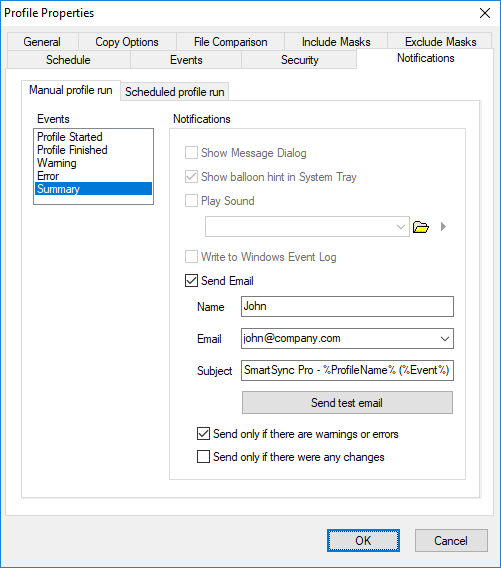
Use the Notification page of the Profile Properties dialog box to control the program's behavior when various events occur, for example you can select the sound that will be played when a backup project is started or completed, or a critical error occurs etc... Notification page contains two tabs to set a different set of notifications for: Manual Profile Run - for projects, which were started manually. Scheduled Profile Run - for projects, which were started automatically by a built-in scheduler.
Events •Profile Started - notify the launching of the profile. •Profile Finished - notify the completion of the profile. •Warning - notify about every warning which is occurred during the profile execution. •Error - notify about critical error which is occurred during the profile execution. •Summary - send an entire log for the last profile execution.
Notifications •Show Message Dialog - shows modal dialog. •Show Balloon Hint in System Tray - shows yellow balloon hint near the tray. •Play Sound - plays specified sound file. •Write to Windows Event Log - writes event to Windows events log. Section Application. •Send to Telegram Bot - send notifications to Telegram Bot @SmartSyncPro Bot The bot will allow you to instantly receive notifications on your mobile phone. Click the "Connect..." button to open the Telegram Bot Settings dialog box and connect to the bot. •Send Email - send notifications to the specified email. If you want to send notification to several emails then separate email addresses by a semicolon. Click Send test email button to check email settings and send test email. •Send only if there are warnings or errors - if there are not warnings or errors in the summary event then email will not be sent. •Send only if there were any changes - send notification only if any files were copied or deleted.
| |
| SmartSync Pro Help Contents | |