
Get more than you expect from a backup program
|
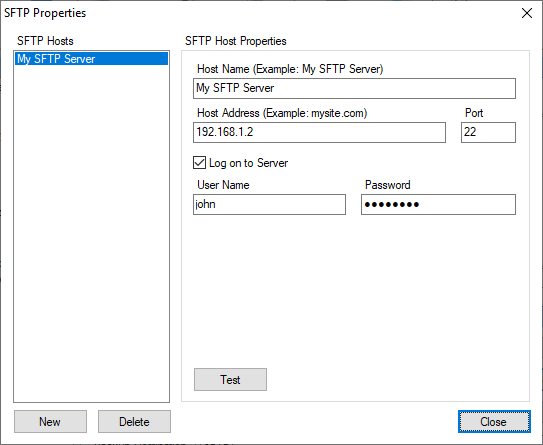
Use the SFTP Properties dialog box to edit the list of SFTP servers.
SFTP Hosts commands
|
Description
|
New
|
Adds new SFTP server to the list.
|
Delete
|
Deletes the selected server from the list.
|
When you select an SFTP server from the list, its properties are displayed in the right side panel.
SFTP Host properties
|
Description
|
Host Name
|
Specify a unique SFTP server nickname. For example: MySFTP.
|
Host Address
|
Specify the SFTP server address. For example mysftpserver.com.
Note: Do not add prefix ftp:// before the address.
|
Port
|
Specify port (Usually 22).
|
Logon to Server
|
Enables you to logon to SFTP server. If left unchecked SmartSync Pro will logon as anonymous user.
|
User Name
|
Specify a user name.
|
Password
|
Specify a password.
|
Test
|
Press this button to make a test connection using specified parameters.
|
|
|
SmartSync Pro Help Contents
| |


 Sign me up

