
Get more than you expect from a backup program
|
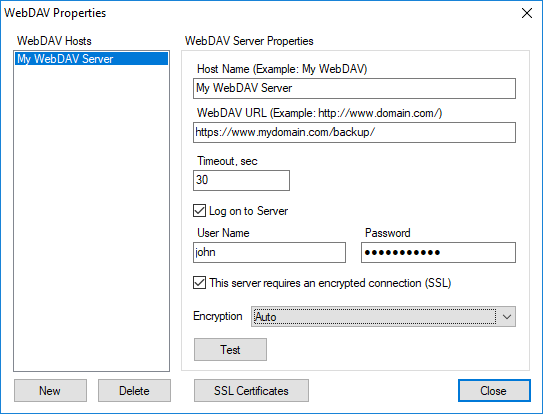
Use the WebDAV Properties dialog box to edit the list of WebDAV servers.
WebDAV Hosts commands
|
Description
|
New
|
Adds new WebDAV server to the list.
|
Delete
|
Deletes the selected server from the list.
|
When you select an WebDAV server from the list, its properties are displayed in the right side panel.
WebDAV Host properties
|
Description
|
Host Name
|
Specify a unique WebDAV server nickname. For example: MyWebDAV.
|
WebDAV URL
|
Specify the WebDAV URL address. For example https://www.mydomain.com/mybackup/. If you need to use non-standard port then separate it by a colon:
https://www.mydomain.com:8080/mybackup/
|
Timeout
|
Specify timeout for http operations.
|
Logon to Server
|
Enables you to logon to WebDAV server. If left unchecked SmartSync Pro will logon as anonymous user.
|
User Name
|
Specify a user name.
|
Password
|
Specify a password.
|
This server requires an encrypted connection (SSL)
|
Check this box if you want to use Secure Socket Layer (SSL) for connection. This also known as HTTPS.
|
Encryption
|
Select type of encryption for SSL connections.
|
Test
|
Press this button to make a test connection using specified parameters.
|
SSL Certificates
|
Open the list of approved SSL certificates. You can view the list or delete unused certificates.
|
|
|
SmartSync Pro Help Contents
| |


 Sign me up

