
Get more than you expect from a backup program
|
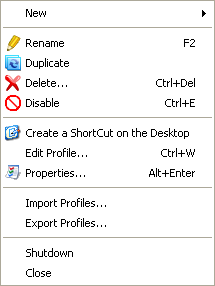
Menu Item
|
Description
|
New > Profile
|
Opens a New Profile Wizard to create new profile.
|
New > Group
|
Creates a new group that may contain subgroups and profiles. You can run all the profiles within a group by a single click.
|
New > Folder
|
Add a folder to selected profile.
|
Rename
|
Renames the selected item (profile, group or folder).
|
Duplicate
|
Duplicates the selected item (profile, group or folder).
|
Delete
|
Deletes the selected item (profile, group or folder).
|
Disable/Enable
|
Disables/Enables the selected item (profile, group or folder).
|
Create a ShortCut on a Desktop
|
Creates a shortcut on the desktop to run selected profile or profile group and then exits.
|
Edit Profile
|
Opens an Edit Profile Wizard to edit profile properties using a wizard.
|
Properties
|
Opens a profile properties or a folder properties dialog box.
|
Import Profiles...
|
Imports profiles from a binary file with .profiles or .prof extensions or from text JSON files with .jprofiles or .jprof extensions.
|
Export Profiles...
|
Exports selected profile or profiles group to a binary file with .profiles extension or to a text JSON file with .jprofiles or .jprof extensions.
|
Shutdown
|
Shutdown SmartSync Pro.
|
Close
|
Closes the SmartSync Pro window. If the option Exit when close main window has checked then the program will shutdown.
|
|
|
SmartSync Pro Help Contents
| |


 Sign me up

