Get more than you expect from a backup program


| Newsletters |
 Sign me up
|


|
Security |
Top Previous Next |
|
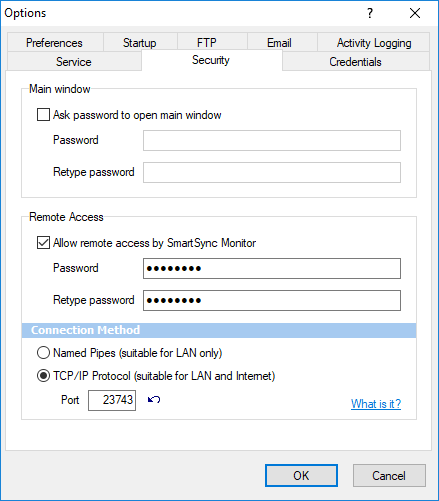
Main Window section:
Ask password to open main window Check this box if you want to protect program settings from changing by unauthorized users.
Retype Password Re-enter the password for verification.
Remote Access section
Allow remote access by SmartSync Monitor Check this box to allow SmartSync Monitor to view and control state of SmartSync Pro remotely.
Password Specify password to access SmartSync Pro remotely.
Retype password Retype the password to be sure that you have wrote it correctly.
Connection Method
Named Pipes Windows named pipes will be used to connect SmartSync Monitor to SmartSync Pro. This options allows to connect to SmartSync Pro running in the local network.
TCP/IP Protocol SmartSync Monitor will connect to SmartSync Pro using TCP/IP protocol and port specified below. You can find more infromation here: https://www.smartsync.com/monitor/
| |
| SmartSync Pro Help Contents | |