Get more than you expect from a backup program


| Newsletters |
 Sign me up
|


|
Exclude Masks |
Top Previous Next |
|
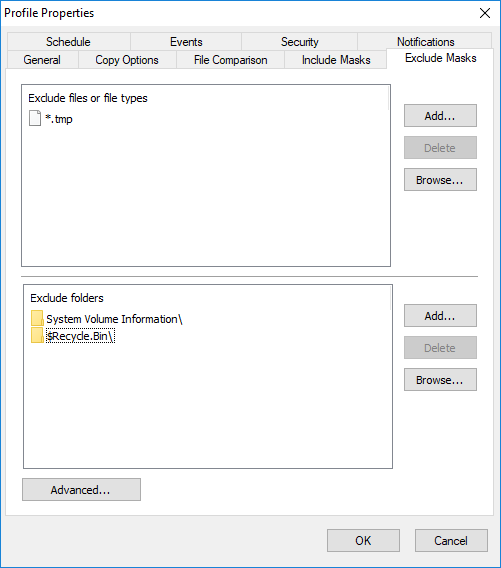
Use the Exclude Masks page of the Profile Properties dialog box to specify which files or folders you want to exclude from synchronization.
Excluded files or file types Specify files to exclude from synchronization. You can specify file mask (for example: *.bak) or file name (for example: Thumbs.db)
Excluded folders Specify folders to exclude from synchronization.
Advanced Exclude file if exists - specifies special conditions to exclude files if there are files with the same name, but with a different extensions. For example if you specify *.dcu in the Mask field and pas in the Extension field then SmartSync Pro will excluded each file with dcu extension if there is a file with the same name, but with pas extension in the same folder. File Attributes - you can exclude files by its attributes. For example you can exclude system and hidden files.
Note •If you want to exclude all subfolders with name Doc then specify "Doc" in Excluded Folders. •If you want to exclude only root folder Doc and include all subfolders Doc like "My Job\Doc" then specify "Doc\". •If you want to exclude only subfolders Doc and include root folder Doc then specify "*\Doc".
| |
| SmartSync Pro Help Contents | |