Get more than you expect from a backup program


| Newsletters |
 Sign me up
|


|
Synchronize with a SmartSync Pro Server |
Top |
|
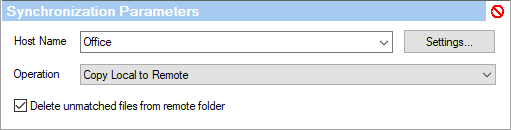
The synchronization parameters set depends on the selected Operation. The Operation defines how files should be copied.
Host Name - select SmartSync Pro server from the list. Click Settings... button to edit SmartSync Pro Server Properties list.
Operation:
Copy Local to Remote - copies files from the local folder to the remote folder. Only new and modified files will be copied (incremental backup). Delete unmatched files from remote folder - automatically deletes files from the remote folder that are not in the local folder. If you delete any files from the local folder, they will be deleted from the remote folder as well.
Copy Remote to Local - copies files from the remote folder to the local folder. Only new and modified files will be copied (incremental backup). Delete unmatched files from local folder - automatically deletes files from the local folder that are not in the remote folder. If you delete any files from the remote folder, they will be deleted from the local folder as well.
Synchronize Local and Remote - keeps the Local and Remote folders synchronized in both directions (bidirectional synchronization). When you add or modify files in the local folder, they will be copied over to the remote folder. If you add or modify files in the remote folder, they will be copied over to the local folder. Synchronize file deletions - automatically deletes files from the remote folder that are not in the local folder and deletes files from the local folder that are not in the remote folder.
Incremental Backup (with compression) - compresses the copied files into the compressed package with .ssp extension. First time all source files will be included into the package. Next time only new and modified files will be included. For each backup file .ssp SmartSync Pro creates an index file with the same name but .sspx extension. Both files must be located in the same folder. Backup Destination - the backup files destination folder. Backup files will have the name which is combined using the current date and time and .ssp extension.
| |
| SmartSync Pro Help Contents | |