Get more than you expect from a backup program


| Newsletters |
 Sign me up
|


|
Copy Options |
Top Previous Next |
|
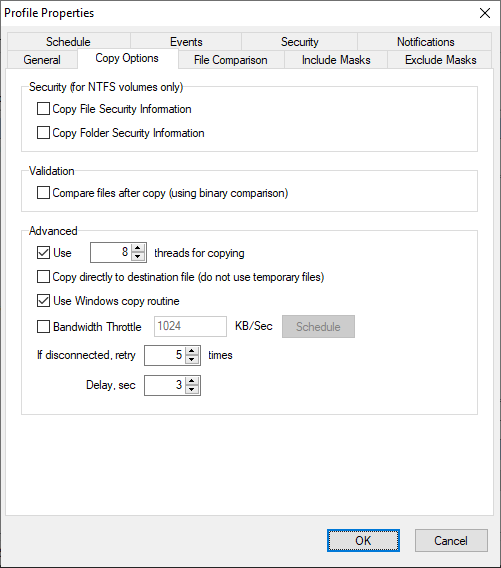
Use the Copy Options page of the Profile Properties dialog box to set an advanced copy options.
Security (for NTFS volumes only) Copy File Security Information - causes SmartSync Pro to copy file permissions and other security information when it copies files from an NTFS volume to an NTFS volume. Copy Folder Security Information - causes SmartSync Pro to copy folder permissions and other security information when it copies folders from an NTFS volume to an NTFS volume.
Validation Compare files after copy - causes SmartSync Pro to perform a binary comparison of the source and copied files to be sure that it was copied correctly.
Advanced Use x threads for copying - if checked SmartSync Pro copies files in a specified number of parallel threads, The new option speeds up file transfer for remote servers/NAS that have high latency. This is especially effective for copying a large number of small files. Note: available for local synchronization only. Copy directly to destination file - causes SmartSync Pro to copy files directly over the destination files. Normally SmartSync Pro copies the source file to a temporary file and then renames it. Transfer only file differences - When checked, this feature performs delta-level synchronization, transmitting only the specific segments of a file that have been modified. Rather than re-sending the entire file, SmartSync Pro executes a binary comparison to isolate changes and pushes only that unique data to the destination. This method significantly optimizes bandwidth efficiency and reduces synchronization latency compared to standard file transfers, which redundantly upload the complete file regardless of the size of the update. Use Windows copy routine - forces to use Windows built-in copy function instead of a sequence of read/write operations. Bandwidth Throttle - limits ("throttle") the quantity of data SmartSync Pro transmits and/or accepts within a specified period of time. Bandwidth throttling helps limit network congestion. Schedule - click this button to open traffic schedule dialog where you can setup when SmartSync Pro could use all available bandwidth and when it will use a specified bandwidth throttle settings. If disconnected, retry xxx times - Sets the number of retries to restore connection and repeat last operation. Available for Packet Synchronization only.
| |
| SmartSync Pro Help Contents | |